Session Management API
The Session Management API allows Capture API customers to programmatically create and manage user sessions with fine-grained access control through scopes.
Overview
The Session Management API is designed for EHR and LIS systems that integrate with Tiro.health using the Capture API. It enables you to:
- Create sessions programmatically with specific scopes and FHIR context
- Control access to resources throughout the session lifetime using scope-based permissions
- Handover sessions to end-users in a browser environment
- Terminate sessions when the user logs out or the session expires
This API is particularly useful when you need to:
- Launch Tiro.health forms with pre-configured patient and encounter context
- Restrict what data users can access during a session
- Integrate Tiro.health into your application's authentication flow
- Provide seamless user experience with session continuity
Base URL
The Session Management API is served by the Tiro.health Auth Service:
https://auth.tiro.health
Authentication
POST /sessions, GET /sessions/{id} and DELETE /sessions/{id} authenticate with your API key over HTTP Basic — the base64 encoding of client_id:client_secret. The two handover endpoints are unauthenticated by design: they are opened by the end-user's browser and carry a single-use token instead.
Session Lifecycle
A typical session follows this lifecycle:
- Session Creation: Your backend calls
POST /sessionswith the session user (the clinician the session acts as), plus scopes, FHIR context (Patient, Encounter) and apost_submit_redirect. The session is created inactive and comes back with a single-usehandover_token - Browser Handover: The end-user's browser is sent to
/sessions/$handoverwith that token and anextLaunch URL. The session is activated, a secure cookie is set in the browser, and the user lands on the task - Completing the Report: The user fills in and submits the report, with access controlled by the session's scopes
- Return to Your System: On submit, Tiro.health sends the browser back to your
post_submit_redirect, with the resultingQuestionnaireResponseand theTaskappended as query parameters - Session Termination: Your backend deletes the session via
DELETE /sessions/{id}(equivalent to logout), or it expires automatically
The session only becomes usable at step 2 — the handover is what activates it and binds it to the end-user's browser. Your backend never holds the session cookie.
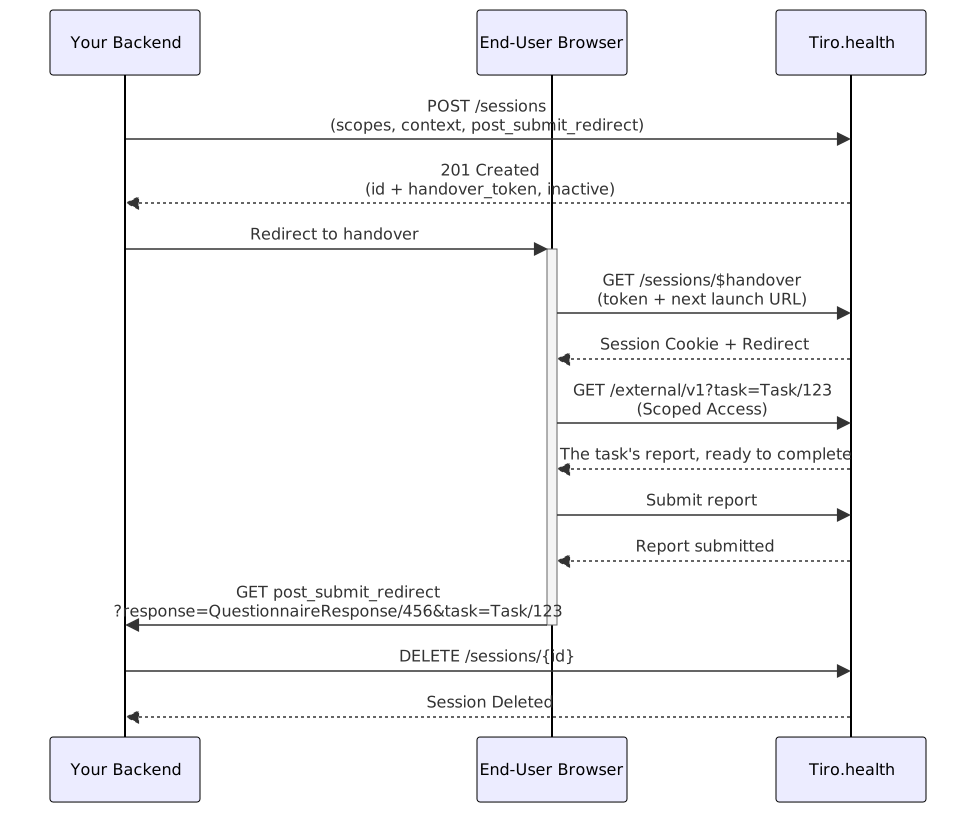
Create a Session
Creates a session for an end-user, optionally with FHIR context and scope restrictions. The session is created inactive: it does nothing until the handover activates it in the user's browser.
The session user is required: identify who the session acts as via the user field or a fhirContext entry with type: "Practitioner". Requests without a resolvable user fail with 422.
Request Body
- Name
scope- Type
- string
- Description
Space-separated list of requested scopes (e.g.,
"patient/Patient.read patient/QuestionnaireResponse.*"). These scopes control what data the user can access during the session. A list of strings is also accepted. See Scope-based Access Control.
- Name
patient- Type
- integer
- Description
FHIR server ID of the patient to associate with this session.
- Name
encounter- Type
- integer
- Description
FHIR server ID of the encounter to associate with this session.
- Name
user- Type
- integer
- Description
FHIR server ID of the user the session belongs to. Alternatively, identify the user with a
fhirContextentry of typePractitioner— one of the two is required. When both are provided, theuserfield wins.
- Name
fhirContext- Type
- array
- Description
Array of FHIR context items using external identifiers to specify the Patient, Encounter, and Practitioner. Use this when integrating with systems that use different identifier namespaces. See FHIR Context for details.
- Name
deployment_mode- Type
- string
- Description
How Tiro.health renders for this session.
"embedded"(the default) strips the surrounding application chrome — navigation, top bar — for use inside an iframe, WebView, or embedded browser of your system."standalone"keeps the full application UI, for users working in a regular browser tab. This sets the session default; the Launch URL'sviewModeparameter can override it per launch.
- Name
post_submit_redirect- Type
- string
- Description
URL in your own system to send the user back to once they submit the report. Tiro.health appends the resulting response and the task as query parameters, e.g.
?response=QuestionnaireResponse/456&task=Task/123, so you know what was submitted. A Task can also carry its ownpost-submit-redirectinput; the session value takes precedence over it.
- Name
post_cancel_redirect- Type
- string
- Description
URL in your own system to send the user back to when they cancel out of the report instead of submitting it.
Response Fields
- Name
id- Type
- integer
- Description
Identifier of the session. Pass it to
DELETE /sessions/{id}to end the session.
- Name
handover_token- Type
- string
- Description
Single-use token that activates the session. Hand it to the end-user's browser via the handover endpoint. It expires after 5 minutes.
- Name
active- Type
- boolean
- Description
falseon creation. The session only becomes active once the handover completes.
- Name
user- Type
- object
- Description
Reference to the Practitioner the session acts as, e.g.
{"type": "Practitioner", "reference": "Practitioner/456"}.
- Name
patient- Type
- object
- Description
Patient launch context resolved for this session, if any.
- Name
encounter- Type
- object
- Description
Encounter launch context resolved for this session, if any.
- Name
data_tenant- Type
- object
- Description
The data tenant this session belongs to.
- Name
deployment_mode- Type
- string
- Description
The deployment mode the session was created with.
- Name
fhir_server- Type
- object
- Description
The effective
scopelist granted to the session, after downscoping. Theaddressfield isnullfor API-created sessions.
- Name
expired_timestamp- Type
- datetime
- Description
When the session expires (7.5 days after creation).
Submitting or cancelling sends the user back to post_submit_redirect; saving a draft or closing the tab does not. Don't treat the redirect as your only end-of-session signal — delete the session from your backend when you are done with it.
Create Session Request
curl -X POST https://auth.tiro.health/sessions \
  -u "<client_id>:<client_secret>" \
  -H "Content-Type: application/json" \
  -d '{
    "scope": "patient/Patient.read patient/QuestionnaireResponse.* patient/Questionnaire.read",
    "user": 456,
    "patient": 123,
    "deployment_mode": "embedded",
    "post_submit_redirect": "https://ehr.example.com/reports/done"
  }'
Response (201 Created)
{
  "id": 789,
  "handover_token": "hDk3n...T9wQ",
  "active": false,
  "user": { "type": "Practitioner", "reference": "Practitioner/456" },
  "patient": { "type": "Patient", "reference": "Patient/123" },
  "encounter": null,
  "deployment_mode": "embedded",
  "fhir_server": {
    "address": null,
    "scope": [
      "patient/Patient.rs",
      "patient/QuestionnaireResponse.cruds",
      "patient/Questionnaire.rs"
    ]
  },
  "post_submit_redirect": "https://ehr.example.com/reports/done",
  "expired_timestamp": "2026-07-14T18:00:00Z"
}
Session Handover
The handover endpoint activates the session: it consumes the single-use handover_token, sets the authentication cookie in the end-user's browser, and redirects to next. It must be reached by the end-user's browser — this is the step that binds the session to that browser. Calling it from your backend would set the cookie on your server, not on the user.
The endpoint accepts the same two parameters either way:
GET /sessions/$handover?token=…&next=…— query parameters. Simplest: just send the browser to the URL.POST /sessions/$handover— form-encoded body. Use when you prefer a form submission, or already have one.
Both return 303 See Other with the session cookie set.
Parameters
- Name
token- Type
- string
- Description
The
handover_tokenfrom the session creation step. Single-use, and expires after 5 minutes.
- Name
next- Type
- string
- Description
Where to send the user after activation. Use the Launch URL below to open a Task.
A session can only be handed over once, while it is still inactive. Replaying a consumed or expired token returns 401.
The next Launch URL
Point next at https://app.tiro.health/external/v1 — the entry point for opening the Tiro.health application from an external system. Note the host: this is a page on the application (app.tiro.health), not an endpoint on the auth server. It resolves the Task and sends the user to the right page for its current status. Use it rather than linking to an application page directly: the internal page URLs are an implementation detail and may change without notice.
Provide either task or task:identifier:
- Name
task- Type
- string
- Description
FHIR reference to the task to open, e.g.
Task/123. Use this when you store the Tiro.health task id.
- Name
task:identifier- Type
- string
- Description
External identifier of the task, in
{system}|{value}format. Use this when you only keep your own identifier — the same one you set onTask.identifierwhen creating the task. The identifier must match exactly one task. Remember to URL-encode the value: the|separator becomes%7C, and the:in the system URL becomes%3A.
- Name
viewMode- Type
- string
- Description
Optional.
embeddedrenders the report without the surrounding application chrome (navigation, top bar) — use this inside iframes and embedded browsers. Defaults to the session'sdeployment_mode.
- Name
readonly- Type
- string
- Description
Optional.
readonly=yesopens the report read-only. The value must be the literalyes. Only applies when the task opens in the report editor (non-draftstatuses).
The task's status determines the destination:
| Task status | Destination |
|---|---|
draft | Form selection, so the user can pick a questionnaire for the task |
ready, in-progress, completed | The report editor, opened on the task's questionnaire response |
failed | Error — the task cannot be opened |
Patient and encounter context is read from the task itself, so you do not need to pass them.
The launch page itself can fail: 400 when neither task nor task:identifier is provided (or the value is malformed), 404 when no task matches the identifier, 409 when more than one matches, and 422 when the task cannot be opened (status failed, or a non-draft task without a questionnaire response yet).
Session Handover
https://auth.tiro.health/sessions/$handover
  ?token=<handover_token>
  &next=https%3A%2F%2Fapp.tiro.health%2Fexternal%2Fv1%3Ftask%3DTask%2F123
Launch URLs for next
https://app.tiro.health/external/v1?task=Task/123
Response (303 See Other)
// Redirects to the 'next' URL with session cookie set
Location: https://app.tiro.health/external/v1?task=Task/123
Set-Cookie: auth_session=<session_id>; HttpOnly; Secure; SameSite=Strict
Get Session Information
Retrieves a session. There are two ways in:
GET /sessions/{id}— from your backend, authenticated with your API key. Returns404if the session belongs to another data tenant.GET /sessions/current— from the end-user's browser, authenticated with the session cookie. Useful for a client to check its own session after handover.
Response Fields
- Name
id- Type
- integer
- Description
Unique identifier for the session.
- Name
user- Type
- object
- Description
Reference to the Practitioner the session acts as, e.g.
{"type": "Practitioner", "reference": "Practitioner/456"}.
- Name
data_tenant- Type
- object
- Description
Data tenant associated with this session.
- Name
patient- Type
- object
- Description
Reference to the Patient launch context, or
null.
- Name
encounter- Type
- object
- Description
Reference to the Encounter launch context, or
null.
- Name
active- Type
- boolean
- Description
Whether the session is currently active.
- Name
expired_timestamp- Type
- datetime
- Description
When the session expires.
- Name
created_timestamp- Type
- datetime
- Description
When the session was created.
- Name
last_modified_timestamp- Type
- datetime
- Description
When the session was last modified.
- Name
deployment_mode- Type
- string
- Description
Either
"embedded"or"standalone".
- Name
fhir_server- Type
- object
- Description
The effective
scopelist granted to this session. Theaddressfield isnullfor API-created sessions; the FHIR API base URL ishttps://reports.tiro.health/fhir/r5.
Get Session Request
curl https://auth.tiro.health/sessions/789 \
  -u "<client_id>:<client_secret>"
Response (200 OK)
{
  "id": 789,
  "user": { "type": "Practitioner", "reference": "Practitioner/456" },
  "data_tenant": {
    "id": 1,
    "name": "Hospital Name"
  },
  "patient": { "type": "Patient", "reference": "Patient/123" },
  "encounter": null,
  "active": true,
  "expired_timestamp": "2026-07-14T18:00:00Z",
  "created_timestamp": "2026-07-07T10:00:00Z",
  "last_modified_timestamp": "2026-07-07T10:00:00Z",
  "deployment_mode": "embedded",
  "fhir_server": {
    "address": null,
    "scope": [
      "patient/Patient.rs",
      "patient/QuestionnaireResponse.cruds",
      "patient/Questionnaire.rs"
    ]
  }
}
Delete a Session
Terminates a session by marking it inactive. This is equivalent to logging the user out: the session cookie in their browser stops working immediately.
Call this from your backend with your API key, using the id returned when you created the session. Deleting a session that belongs to another data tenant returns 404.
Delete Session Request
curl -X DELETE https://auth.tiro.health/sessions/789 \
  -u "<client_id>:<client_secret>"
Response (204 No Content)
// Empty response body
Scope-based Access Control
Scopes define what actions and resources a user can access during their session. When you create a session with specific scopes, those restrictions are enforced throughout the entire session lifetime.
Scope Format
Scopes follow the FHIR SMART on FHIR format, with an optional filter suffix: <context>/<resourceType>.<action>[?filters]
Filters are currently honored for Questionnaire scopes only, where they narrow which report templates the session can access — see Template Access and Filtering below.
Contexts:
patient/<resourceType>.<action>— access limited to the session's launched patient. Only meaningful when the session is created with apatient(or a PatientfhirContextitem); without one,patient/scopes grant nothing.user/<resourceType>.<action>— access to resources the session user owns or authored. Use this when the session has no patient context.system/<resourceType>.<action>— tenant-wide access. Only kept for sessions in EHR-managed tenants; in regular tenants it is downgraded touser/at session creation.
Actions: read, write, or *. Note that write does not include read — a session that saves reports must also be able to read them back, so pair .read and .write, or use .*.
Recommended scopes for a patient-launched session:
patient/Patient.read patient/Encounter.read patient/QuestionnaireResponse.* patient/Questionnaire.read
patient/QuestionnaireResponse.*— create, read, and update the patient's reportspatient/Patient.read/patient/Encounter.read— read the launch contextpatient/Questionnaire.read— read the report templates the form needs
Reports authored in Tiro.health are stored as FHIR QuestionnaireResponse resources, so QuestionnaireResponse is the resource type you scope to control read and write access to captured data.
SMART v2 permission syntax is also accepted: any combination of c (create), r (read), u (update), d (delete), s (search), e.g. patient/QuestionnaireResponse.cruds. The v1 forms are converted automatically (.read ⇒ .rs, .write ⇒ .cud, .* ⇒ .cruds), and the session's stored scopes (fhir_server.scope) are always in v2 form.
How Scopes Work
When a session is created with scopes:
- The requested scopes are downscoped to what your data tenant allows (see below), then stored with the session
- All FHIR API requests during the session are checked against these scopes
- Requests for resources or actions not covered by the scopes are denied
- Scopes remain active until the session is deleted or expires
The effective scopes are returned in the create-session response under fhir_server.scope — check that field if a session gets unexpected 403s.
EHR-managed Data Tenants
In data tenants managed by an EHR integration, sessions are automatically downscoped at creation:
Patient,Encounter,Practitioner, andDocumentReferenceare capped to read-only by ID: no create, update, delete, or search — regardless of what was requested. End-users open these resources from the launch context; they never edit them in Tiro.health, since the EHR owns that data.- A
*wildcard is expanded to the EHR-relevant set: fullQuestionnaireResponseaccess, read+searchQuestionnaire, and read-only context resources. - Other resource scopes (e.g.
QuestionnaireResponse) pass through with the requested permissions.
This downscoping applies to user sessions only. Machine-to-machine calls with your API key are governed by the key's own scopes, so background data imports keep working in EHR-managed tenants. Context resources can also be created at session creation via fhirContext role/new.
Example: Restricted Session
# Create a read-only session for patient data
curl -X POST https://auth.tiro.health/sessions \
  -u "<client_id>:<client_secret>" \
  -H "Content-Type: application/json" \
  -d '{
    "scope": "patient/Patient.read patient/Encounter.read patient/QuestionnaireResponse.read",
    "user": 456,
    "patient": 123
  }'
In this session, the user can read patient, encounter, and report data but cannot modify anything. Any attempt to create or update resources will be denied.
Template Access and Filtering
The Questionnaire scope controls which report templates the session user can pick. Template access is delegated from your API key: at session creation the scope is automatically constrained to the projects your integration's service account belongs to, so the session user needs no project membership of their own — including users created on the fly via fhirContext role/new.
You can narrow the delegation with filters on the scope (a Tiro.health extension to SMART on FHIR scopes):
patient/Questionnaire.read?project=53
patient/Questionnaire.read?url=https://templates.example.org/ct-scan
patient/Questionnaire.read?specialty=urology
project— one of your service account's projects; other projects are ignoredurl— a single template by canonical URL, without a|versionsuffixidentifier,version,specialty— further narrowing, combined with the project filter
Don't pin a version in the url filter (url=https://templates.example.org/ct-scan|2.0.0).
The template picker offers the latest active version of each template, so a session whose
scope pins any other version sees an empty template list rather than an error. Use the
bare canonical URL to restrict a session to a single template.
Without filters, the user can choose from all templates in your service account's projects. If your account belongs to no projects, the session gets no template access — contact Tiro.health to link your API key to the right project.
FHIR Context
Sessions can include FHIR context to associate them with specific patients and encounters. There are two ways to specify context:
Using Direct IDs
When you have the internal FHIR server IDs, use the direct patient and encounter parameters:
{
  "patient": 123,
  "encounter": 456
}
This is the simplest approach when your system already uses Tiro.health's FHIR server IDs.
Using External Identifiers with fhirContext
When integrating with external systems that use their own identifier namespaces, use the fhirContext array following the SMART on FHIR launch context specification:
{
  "fhirContext": [
    {
      "identifier": {
        "system": "http://hospital.org/patient-ids",
        "value": "P-12345"
      },
      "type": "Patient",
      "role": "https://tiro.health/fhir/role/new"
    },
    {
      "identifier": {
        "system": "http://hospital.org/encounter-ids",
        "value": "E-67890"
      },
      "type": "Encounter",
      "role": "https://tiro.health/fhir/role/new"
    },
    {
      "identifier": {
        "system": "http://hospital.org/user-ids",
        "value": "dr-smith"
      },
      "type": "Practitioner",
      "role": "https://tiro.health/fhir/role/new"
    }
  ]
}
Key features:
identifier: Specifies the external system identifier (system + value)type: Resource type —Patient,Encounter, orPractitionerrole: Controls how the identifier is resolved (see below)
Identifier Resolution
The role of each context item determines what happens when no resource matches the identifier:
https://tiro.health/fhir/role/new— create if missing. When no resource matches, a new one is created from the identifier. This is how patient, encounter, and user records are materialised in your data tenant: you do not need to import them through the FHIR API first.https://tiro.health/fhir/role/find— look up only. When no resource matches, session creation fails with404(e.g."No patient found with identifier …").
If role is omitted it defaults to "launch", which behaves like find — it does not create missing resources.
A Practitioner created via role/new starts with no project memberships — but they don't need any to pick a template: sessions carry your API key's template access on the Questionnaire scope (see Template Access and Filtering). Just make sure the session's scopes include Questionnaire.read.
Security Considerations
Token Expiration
- Session tokens expire after 5 minutes and are single-use only
- Sessions expire 7.5 days after creation
- Expired tokens cannot be used for handover and will return a 401 error
Token Security
- Session tokens should be treated as sensitive credentials
- Tokens are deleted immediately after successful handover (one-time use)
- Always use HTTPS when transmitting tokens
- Never log or store session tokens
Cookie Security
Session cookies are configured with security best practices:
HttpOnly- Cannot be accessed via JavaScriptSecure- Only transmitted over HTTPSSameSite=Strict- Protection against CSRF attacks- Scoped to
tiro.healthdomain
Best Practices
- Minimize scope - Only grant the minimum permissions needed
- Short-lived tokens - Use the default 5-minute token expiration
- Secure token transmission - Pass tokens via secure form POST, not URL parameters
- Immediate handover - Complete the handover flow as quickly as possible
- Explicit logout - Always delete sessions when users log out
- Monitor sessions - Track active sessions and their expiration times